
Callers expect an answer. When they don’t get one, many don’t wait. In a September 2025 CallRail survey of 1,000 US consumers, 42% said they leave a voicemail when a business doesn’t pick up, 24% switch to online chat and 21% immediately call another business. That is a vendor survey of what people say they do, not a measurement of what they did, but the direction is clear: an unanswered call is often a lost job.
So you start comparing options, and the terms stop helping. An “AI answering service” may take a message, or it may book the job. A “virtual receptionist” may be a person in a call center or software. One provider bills per minute, the next per call, a third a flat monthly fee. Two quotes can look similar and do completely different work.
This guide sorts the options by what they finish on the call, what they cost at your volume and when each one is the better choice, including the cases where we would tell you to use a person. It ends with a handoff plan, the rules to know and a 30-day pilot you can run before you commit.
Who this guide is for: owners and office managers at small and mid-size US service businesses plumbing, HVAC, roofing, Restoration, dental, legal, salons, property management with a phone that rings while staff are busy or the office is closed. Who it is not for: contact centers with hundreds of agents. Their tools and math are different.
Three questions that tell you what you are really buying
Two products can both be called an AI answering service and do different jobs. One takes a message. The other books the job. Ask every provider these three questions before you compare prices.
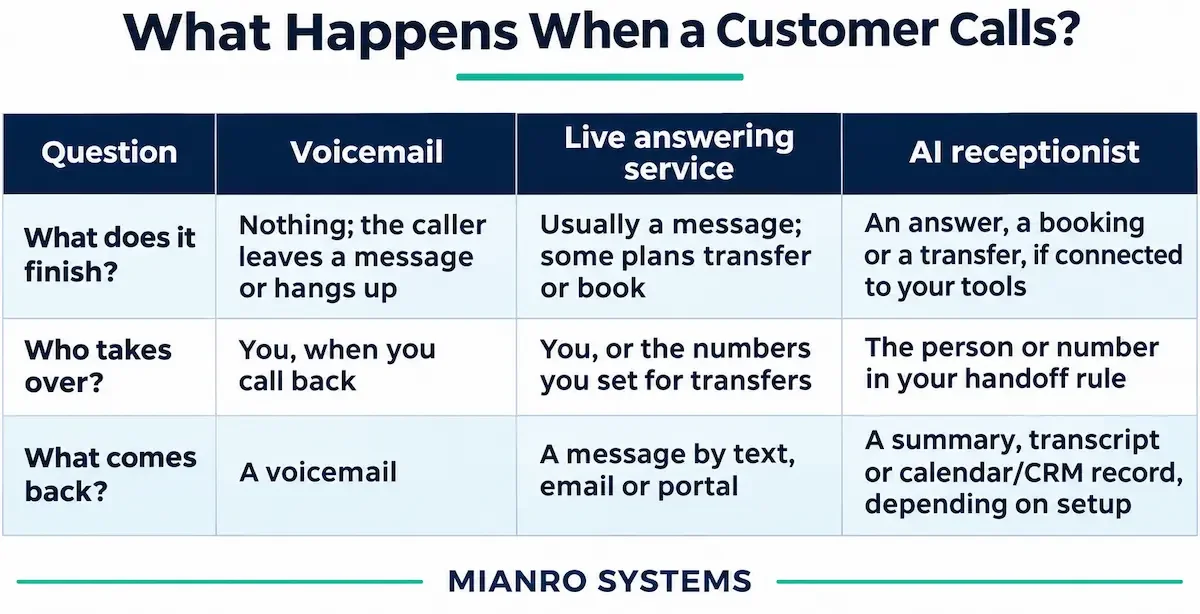
1. What does it finish on the call? A message, an answer, a booking, a payment or a transfer. The more it finishes, the fewer callbacks land on your desk.
2. Who takes over, and when? A person, a number, a voicemail, or nobody. Ask how fast and with what information.
3.
What comes back to you? A
text, an email, a transcript, a recording, or a record in your calendar or CRM.
|
Question |
Voicemail |
Live answering service |
AI receptionist |
|
What does it finish? |
Nothing; the caller leaves a message or hangs up |
Usually a message; some plans transfer or book |
An answer, a booking or a transfer, if connected to your tools |
|
Who takes over? |
You, when you call back |
You, or the numbers you set for transfers |
The person or number in your handoff rule |
|
What comes back? |
A voicemail |
A message by text, email or portal |
A summary, transcript or calendar/CRM record, depending on setup |
Expert Tip: Ask the provider to show you a real call, with a recording or a live demo not a slide. What you hear is what your callers will hear.
Decision guide: which one should you look at first?
1. Do most of your calls end in a booking or a simple answer? Look at an AI receptionist first.
2. Do callers often arrive upset, grieving or in a crisis? Look at a live service first.
3. Does the person answering need a license or credential? Look at a live service or your own staff.
4. Do you get very few calls? Compare the cheapest live plan with a free trial of AI. The volume at which AI pays off is not established; sources disagree, so get both quotes.
5. Both routine and sensitive calls? Read the hybrid section. You may need both.
Not sure which describes you? Do the “last twenty missed calls” audit later in this guide. It takes about 30 minutes and answers the question with your own calls.
Side-by-side comparison
“Depends on setup” appears where the honest answer is that it varies by provider and configuration. Costs are vendor-quoted ranges from guides written by vendors, dated in Part 2.
|
|
Voicemail or phone menu |
Live answering service |
AI receptionist |
Hybrid |
|
Who answers |
A recording |
A person at a call center |
Software |
Software first, a person for the rest |
|
Takes a message |
Yes, if the caller leaves one |
Yes |
Yes |
Yes |
|
Answers questions about your business |
Basic recorded information only |
What is in the script |
From the information you give it |
Yes, with a person for what it cannot answer |
|
Books an appointment on the call |
No |
Usually not; some plans offer it |
Yes, if connected to your calendar |
Yes |
|
Handles several calls at once |
Records them in turn |
Limited by staffing |
Depends on provider and setup (ask about peak capacity) |
Depends |
|
Hours |
Always on |
Depends on plan; after-hours often costs more |
Depends on setup |
Depends |
|
Hands a caller to a person |
No |
Yes, to the numbers you set |
Depends on setup (ask and test) |
Built in |
|
What you get back |
A voicemail |
A message by text, email or portal |
A summary, transcript or record |
Both |
|
How it bills |
Free or bundled |
Per minute, per call or monthly bundle |
Per minute, per call, per unique caller or flat monthly |
Both |
|
Typical cost (vendor-quoted, 2026) |
Free to low |
$0.75–$1.50/min; $1–$11/call |
$0.05–$0.30/min; $25–$300/month |
Both, at reduced volume each |
|
Best for |
A backup, not a front line |
Calls that need empathy, judgment or a licensed person |
Routine, after-hours and busy-hour calls |
Businesses with both kinds of calls |
|
Main weakness |
Many callers don’t leave a message (survey answers range widely; see Part 3) |
The message still needs a callback |
Setup quality, unusual requests, the handoff |
More moving parts to manage |
What Each Option Really Does
What a live answering service does
A live answering service is a staffed call center that answers your phone in your business name. Operators follow a script you provide, take a message, and transfer calls to the numbers you choose. An operator usually answers for many businesses during a shift.
What it does well. A person answers. That matters when a caller is upset, when a situation needs nuance, and when the topic is sensitive. A good operator can calm a caller down, hear what is not being said, and decide that a call needs the on-call manager now. A live service also covers nights, weekends and holidays you can’t staff yourself.
What limits it. The operator knows your script, not your business. Some services can answer common questions, check a calendar or book, depending on the plan and how much you set up. The usual result, though, is a message you have to return. Every message is a callback on your list, and every callback is a chance for the caller to have already hired someone else.
How it bills. Per minute, per call or a monthly bundle of minutes, usually with a monthly minimum. Calls after hours often cost more. Part 2 has the numbers.
Expert Tip: Ask exactly what the operator can do beyond taking a message: check your calendar, book, transfer, send a text, look up an existing customer. Then ask what each of those costs.
What an AI receptionist does, and what it needs
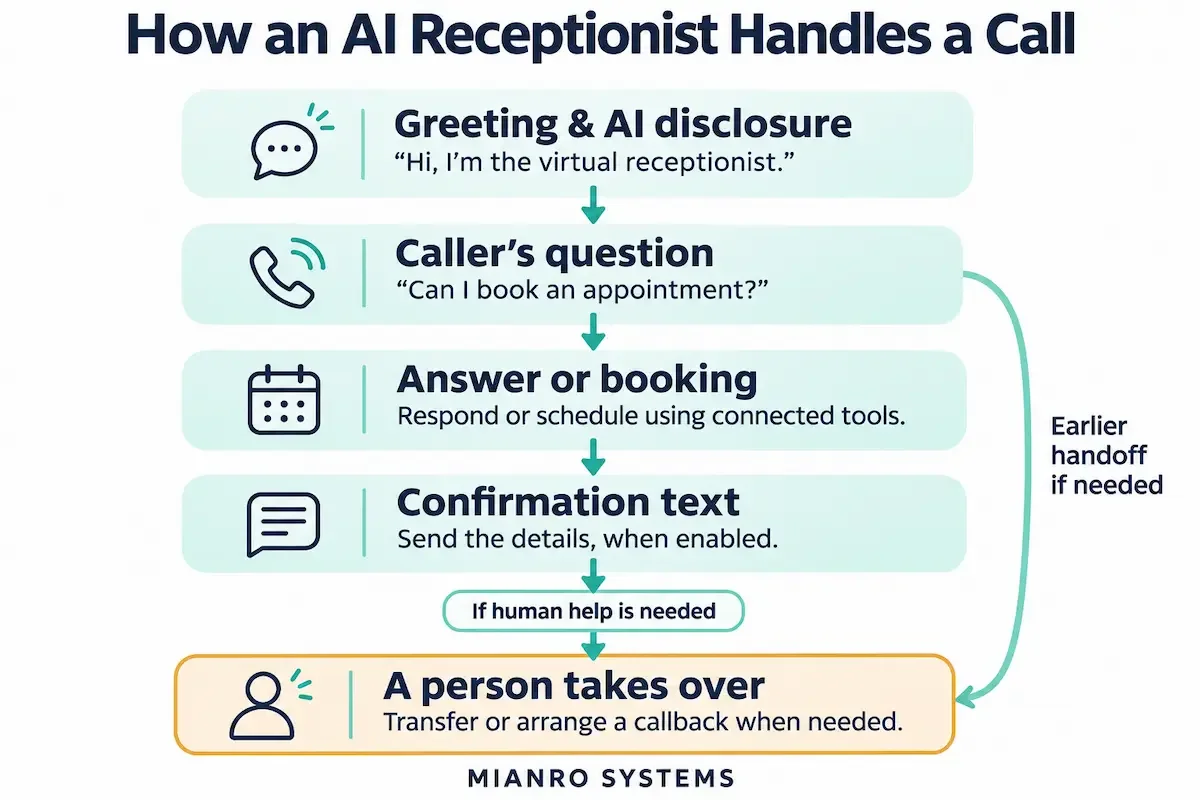
An AI receptionist is software that answers the phone by voice. It works out what the caller wants, answers from the information you give it, and if it is connected to your tools books the appointment, captures the details, sends a confirmation text and transfers the call to a person when needed. It can usually take calls at any hour.
What it needs to work
• Your information: services, service area, hours, prices or price ranges, policies and the questions callers ask most.
• A calendar connection if you want it to book. Without one, it can only take a message.
• A destination for call details: your CRM, a shared inbox or a text to the right person.
• A handoff rule: who takes over, when, and how fast.
What can go wrong
• Misheard details. Names, addresses and phone numbers can be captured wrong, so it should read them back.
• Requests outside its information. It needs a clear fallback: transfer, message or alert.
• Out-of-date information. If your prices or hours change and nobody updates it, it gives the old answer confidently.
• No calendar connection. Then it is a message-taker with a better transcript.
• A poor handoff. A transfer to a phone nobody answers is worse than no transfer.
Two labels to watch
“AI answering service.” Some products with this name only record the call and send you a transcript. That is useful, but it is not a receptionist. Use the three questions to find out which you are buying.
Chat-only “receptionists.” Some products sold as AI receptionists answer website chat and text messages and do not answer phones. Confirm that voice calls are included. For what website chat does well after hours, see our guide to AI chat for after-hours leads.
Should callers know it’s an AI? Yes. Tell callers at the start of the call that they are speaking with an AI assistant. It sets expectations, it builds trust when the AI does its job well, and some states are adding disclosure rules (see Part 4). Any provider promising that callers “won’t be able to tell” is selling the wrong thing.
Expert Tip: Listen to recorded calls from the provider’s own customers, including the difficult ones a caller with an accent, a bad connection, a question it couldn’t answer. A demo script tells you how it sounds on a good day.
Hybrid setups: AI and a person together
You don’t have to choose one. Many businesses use AI for the calls it handles well and a person for the rest. Three common patterns:
• AI first, person second. The AI answers and books. When a request is outside what it can handle, or the caller asks for a person, it transfers to a staff number or a live service.
• Split by time. AI covers after hours, weekends and lunch; a person answers during staffed hours.
• Split by line. A booking line answered by AI, and a separate line for sensitive matters answered by a person.
Whichever you choose, define four things for each call type: who is called, how quickly, with what information, and what the caller hears while waiting.
Cost note: a hybrid pays for both, though each part usually handles fewer minutes than it would alone. Compare the total, not each piece.
Expert Tip: Before you set anything up, write the handoff rule as one sentence per call type. For example: “Gas smell: tell the caller to leave the building and call 911, then transfer to the on-call tech within 60 seconds.” If you can’t write the sentence, you’re not ready to switch it on.
What Each Costs, With the Math
The rate ranges vendors quote
The headline price is not the bill. The billing model, the minimums, the overages and the setup fees decide what you pay. Every figure below comes from pricing guides written by vendors in this market, so treat them as ranges, check them on each provider’s own pricing page, and expect them to differ.
Live answering services
• $0.75–$1.50 per minute, or $1–$11 per call, with monthly minimums of roughly $50–$300 (Retell AI, rates checked September 2026).
• Small-business monthly plans are reported at $135–$450 (AMBS, via Housecall Pro), $175–$700 (OnceHub) and $200–$800 for 50–300 minutes (Aira). The ranges overlap but don’t agree, which tells you plans vary widely.
• After-hours calls cost 20–50% more per minute at many providers (Aira). Not every provider charges this, so ask.
AI answering services and AI receptionists
• $0.05–$0.30 per minute, or $25–$300 a month, in typical small-business plans (Ringly).
• Named examples run from $0.25 per minute to $399 a month (Allo’s comparison page).
•
Watch what the rate includes.
Some AI pricing covers only the AI; phone-line usage and setup can be billed
separately.
The same calls at 100, 300 and 1,000 a month
Here is what the per-minute ranges produce at three call volumes. This is illustrative. It multiplies the vendor ranges above by an assumed average call of four minutes. It is not a quote, and it leaves out the fees listed after the table.
|
Calls per month |
Minutes (4 per call) |
Live answering at $0.75–$1.50/min |
AI at $0.05–$0.30/min |
|
100 |
400 |
$300–$600 |
$20–$120 |
|
300 |
1,200 |
$900–$1,800 |
$60–$360 |
|
1,000 |
4,000 |
$3,000–$6,000 |
$200–$1,200 |
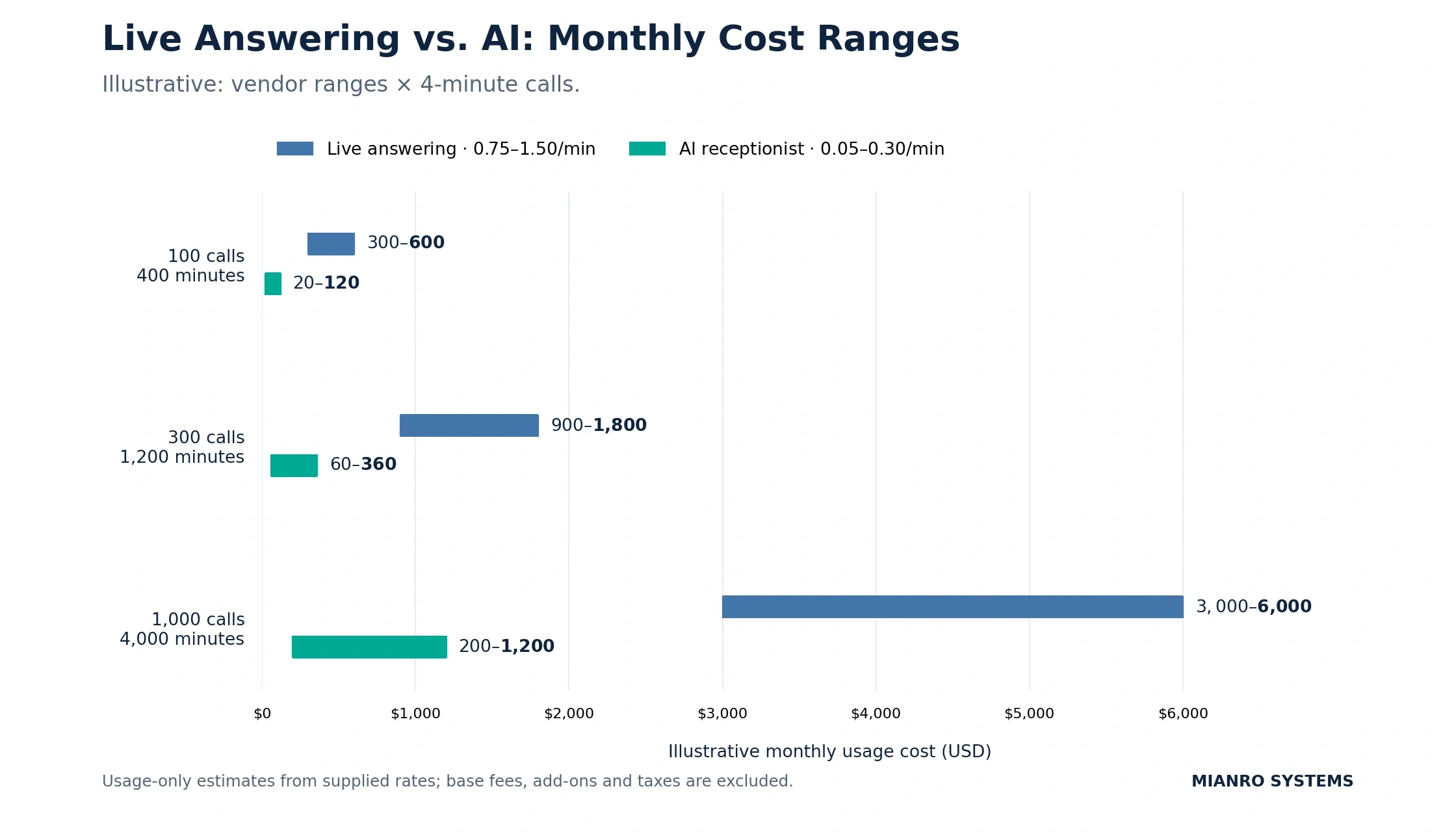
The four-minute assumption matters. Calls that only take a message are often shorter, which lowers the live-service number. Calls where AI books an appointment can run longer. Use your own average call length, which most phone systems report.
Now add what the table leaves out:
• Monthly minimums, which raise the bill in a slow month.
• After-hours surcharges on live services.
• Transfer charges, if the provider bills for forwarding calls.
• Setup, build or integration fees for an AI receptionist.
• Overages on capped monthly plans.
• Phone-line and AI usage billed separately from the plan.
A cross-check. One vendor
guide puts typical small-business usage at 250–500 minutes a month, costing
$330–$925 for a live service and $50–$250 for AI (Ringly). Multiply those minutes
by the per-minute ranges and you get lower figures about $190–$750 live and $13–$150 AI. The
gap is the minimums and fees. That is the point of this section: the per-minute
rate gets you in the right range, and the extras decide where in the range you
land.
Expert Tip: Ask each provider to quote your real monthly minutes and your busiest month, not an average. A plan that fits March may cost far more in July.
The same 300 calls on four billing models
Providers bill in different units, and the cheapest model changes with your call pattern. This example is illustrative: 300 calls of four minutes each (1,200 minutes), priced with example rates from one vendor comparison page (Allo).
|
Billing model |
Example rate |
Cost for 300 calls |
|
Per minute |
$0.25 per minute |
$300 |
|
Per call |
$0.99 per call |
$297 |
|
Per unique caller |
$0.79 per unique caller (if all 300 callers are different) |
$237 |
|
Flat monthly |
$399 a month |
$399 |
Here the flat plan is the most
expensive. Change two things and the order flips. If your calls average eight
minutes, the per-minute bill doubles to $600 while the per-call and flat bills
don’t move. If many callers ring twice, the per-unique-caller bill stays put
while per-call rises. A busy month raises every usage-based bill and leaves the
flat one alone until you hit its cap,
so ask what happens past the cap.
Costs people forget
• Setup and integration. An AI receptionist may carry a one-time build fee, with phone and AI usage billed separately.
• Billing increments. Providers round call time differently by the second, the minute or a larger block. One vendor guide says this can shift cost by 20–30% between providers with the same per-minute rate (Vida). That is a vendor claim, but the mechanism is real: ask how they round.
• Overages, transfers, minimums and contract terms, including what it costs to leave.
• Your own time. A message-taking service creates callbacks. Someone on your team makes them, and some callers will have moved on by then.
Expert Tip: Compare cost per completed call, not cost per call answered. A $1 call that ends in a booking costs less than a $0.50 call that ends in a message nobody returns in time.
What it is worth: a formula, not a promise
Any article that gives you a revenue number for your business is guessing. Use this formula with your own figures:
Monthly value
(Calls recovered per month × share that book × average job value) − monthly cost of the service
Example with made-up numbers:
if better answering recovers 20 calls a month, a quarter of them book, and your
average job is $300, that is 20 × 0.25 × $300 = $1,500, minus the service cost.
Your booking rate and job value will be different, and the number of
“recovered” calls is the hardest part to know. Measure it for 30 days with the
pilot in Part 4 before you trust any estimate
including this one.
Which One Fits Your Calls
How many calls do businesses really miss?
You have probably seen “62% of calls to small businesses go unanswered.” That figure comes from a January 2016 study of 85 small businesses (411 Locals, as traced by JustCall and Carly). It was a small sample, and it is ten years old. It is not a current rate.
Newer figures are bigger samples but come from vendor platforms, reported second-hand:
• 44% unanswered across 70 million calls (Invoca, 2026, as reported by JustCall).
• 28% unanswered in CallRail’s platform data (2026, as reported by Carly).
They disagree, partly because they measure different businesses and define “missed” differently. The honest summary: depending on the dataset, somewhere between a quarter and nearly half of business calls go unanswered. Our AI automation playbook for home service businesses looks at what that costs trades in lost jobs.
What callers do next
• US survey: 42% say they leave a voicemail, 24% switch to chat and 21% immediately call another business (CallRail survey of 1,000 US consumers, September 2025).
• UK survey: only 6% said they would leave a voicemail (YouGov, as cited by Quo). That is a different country and a different question, so it doesn’t cancel the US figure but together they say you can’t count on a voicemail.
• Callbacks: about 69% of missed business calls get no callback within 48 hours (Quo, 2026).
Count your own
Your call log beats any industry figure. Our guide on how to reduce lost revenue from missed business calls includes an audit worksheet you can adapt. Most business phone systems and VoIP providers can export call history. Pull the last 30 days and count three things: calls not answered, calls under 15 seconds (often hang-ups at voicemail), and the times of day they happened. If your system can’t do this, start writing missed calls down this week.
Expert Tip: Look at when the misses happen, not just how many. Misses clustered at lunch and after 5 p.m. point to a coverage fix. Misses spread through the day point to a capacity problem.
When an AI receptionist is the better choice
Each reason below comes with its limit, because every one of them depends on setup.
• Most calls are bookings, price or hours questions, or simple intake. AI is built for repeatable calls. Limit: it only answers well from the information you give it, and you have to keep that current.
• You need coverage after hours or at lunch, and a message isn’t enough. AI can book the job at 9 p.m. Limit: it can only book if it is connected to your calendar, and someone still has to show up.
• Calls arrive together. A busy signal or hold queue costs jobs. Limit: concurrent-call capacity varies by provider. Ask, and test it with several calls at once.
• You want the same details captured every time and sent to your calendar or CRM. Limit: a misheard address is still misheard, so it should read details back.
• Callers speak languages your staff don’t. Limit: language quality varies. Confirm which languages are supported and listen to them yourself.
Expert Tip: The test is whether the AI can finish the task on the call. If it can’t book, it is an answering service with a better transcript.
When a live service or a person is the better choice
We sell an AI receptionist. These are the calls where we would tell you to use a person.
• Calls where empathy is the service. A death, a medical scare, a family in crisis. A person who can slow down and listen is the right answer.
• Regulated or credentialed intake. Where a licensed person must answer or screen the call, check your industry’s rules before automating anything.
• Complex or heated calls. Complaints, disputes and negotiations go better with a person who can use judgment.
• Safety emergencies. Whatever you use, set a rule that a caller describing a risk to life or safety is told to hang up and call 911, and test it. Confirm the exact wording with your provider.
• Very low call volume. A basic live plan can cost less than an AI setup. Sources disagree on where that line is one says under 50 calls a month, another under 10 so get two quotes at your real volume.
• Callers who ask for a person. Any AI option you choose should transfer them, without arguing.
Five business scenarios
These are illustrative examples of call mix, not case studies or results. Use them to picture your own calls. For plumbing shops, see how this plays out in our guide to AI lead generation for plumbers, and for other trades, our guide to AI automation by trade.
|
Business |
Calls that suit AI |
Calls that need a person |
Suggested setup |
|
Plumbing, HVAC or roofing |
Service and quote requests, scheduling, hours, service area |
A burst pipe or gas smell (safety script first), an angry repeat customer |
AI first, transfer to an on-call number |
|
Dental or medical office |
Booking, reschedules, insurance questions, office hours |
Clinical questions, urgent symptoms, billing disputes |
AI for booking; a person or live service for clinical calls. Check privacy rules for patient data |
|
Law firm |
New-matter intake details, consultation scheduling |
Distressed callers, anything that needs a lawyer’s advice |
Staff or a live service for intake, or AI with a strict handoff. Check confidentiality and bar rules |
|
Restoration |
After-hours first notice of loss: address, damage type, photos requested |
A caller in an emergency, insurance questions |
AI to capture details and alert the on-call team, with a safety script |
|
Property management |
Maintenance requests, leasing questions, showing bookings |
Emergencies (fire, flooding, no heat), resident disputes |
AI first, with an emergency transfer |
Audit your last twenty missed calls
This is the fastest way to know which option fits. Pull the last twenty missed or very short calls from your phone log. Call back or check the number for each and sort them into six groups:
1. Booking or new job request
2. Question about services, prices or hours
3. Urgent or emergency
4. Existing customer with an issue
5. Sales pitch or spam
6. Other
Read the result. Mostly
groups 1 and 2: an AI receptionist will likely handle them. Mostly groups 3 and
4, especially emotional calls: start with a live service or staff. A real mix:
a hybrid. Lots of group 5: you need call screening more than either.
Choosing and Setting It Up
Design the handoff before anything else
The handoff is where most phone setups fail, whether the first answer comes from software or a call center. Decide it before you pick a provider. Write one sentence per call type covering four things: who is called, how fast, what the caller hears while waiting and what information the person receives.
Cover at least these cases:
☐ The caller asks for a person.
☐ The caller is upset.
☐ A safety emergency.
☐ A request outside the script or the AI’s information.
☐ The line fails, or the AI isn’t sure what the caller wants.
Then test it the way your callers will: call at night, on a weekend and at lunch, and see who actually picks up.
|
Call type |
Trigger |
Who takes over |
Contact |
Backup |
What is sent |
|
Example: emergency leak |
Caller says water is coming in |
On-call tech |
On-call mobile |
Owner’s mobile |
Name, address, callback number, summary |
|
|
|
|
|
|
|
|
|
|
|
|
|
|
[Download: Handoff worksheet link]
Expert Tip: Name a backup for the backup. A transfer to a phone nobody answers is worse than no transfer, because the caller was promised a person.
Twelve questions to ask any provider
Under each question is what a good answer sounds like.
1. What does it finish on the call message, answer, booking or transfer? Good answer: a specific list, shown on a real call.
2. Which calendar and systems does it connect to, and who sets that up? Good answer: named tools, and a named person responsible for setup.
3. Who takes over, when, and with what information? Good answer: a handoff rule per call type, with the details passed along so the caller doesn’t repeat themselves.
4. How many calls can it handle at once, and has that been tested at a busy time? Good answer: a number, and a test you can run.
5. How does it bill, and what will it cost at my real and my peak volume? Good answer: a written quote at both volumes.
6. What are the setup, overage, after-hours, transfer and cancellation charges? Good answer: every one listed in writing, including “none.”
7. What happens if it doesn’t know the answer? Good answer: it says so, then transfers, takes a message or alerts you and you can hear it happen.
8. Which languages are supported, and can I hear them? Good answer: a list and sample calls.
9. Can I hear real recorded calls, including difficult ones? Good answer: yes, with permission from their customers.
10. Are calls recorded, who can access them and how long are they kept? Good answer: clear settings you control, and a retention period in writing.
11. How does it tell callers it is an AI, and how does it handle recording notices? Good answer: a disclosure at the start of the call that you can review.
12. How do I export my data and leave? Good answer: a simple export and no penalty beyond the contract term.
Expert Tip: A provider that can’t answer questions 3 and 7 plainly hasn’t solved the hard part yet.
Rules to know before you switch it on
This section is general information, not legal advice. Have an attorney confirm what applies to your business and your callers’ states.
• AI voices and the TCPA. The FCC confirmed in a Declaratory Ruling adopted February 2, 2024 and released February 8, 2024 (FCC 24-17) that AI-generated voices count as an “artificial or prerecorded voice” under the Telephone Consumer Protection Act. That matters most for calls your business places, such as follow-up or marketing calls, which need the right consent. Whether and how it affects an AI that only answers inbound calls is a question for your attorney. Some secondary sources say inbound answering doesn’t need the same consent; we haven’t confirmed that against the FCC text, so we don’t state it as a rule.
• Recording. Call-recording consent is set by state law, and some states require everyone on the call to agree. Rules differ, so put a recording notice at the start of every recorded call.
• AI disclosure. Some states are adding disclosure rules for AI, and the FCC has proposed one at the federal level . Our advice doesn’t depend on the rules: tell callers they are speaking with an AI.
• Texting after the call. Follow-up texts need the right consent, and business texting from US numbers generally requires carrier registration. Confirm current requirements with your provider and counsel.
• Sensitive information. If calls include health, legal or payment details, confirm how the provider stores and protects them, and check your industry’s rules, such as patient-privacy rules for dental and medical offices.
Run a 30-day pilot with a scorecard
Don’t switch your whole phone line at once. Run a pilot and decide on evidence.
• Scope: one phone line, one call type or one time window for example, after-hours calls only with a person as fallback.
• Measure every week: calls answered; calls completed on the call (booked, answered, routed); calls handed off, and whether the handoff worked; caller complaints; and bookings that actually show up.
• Review recordings: listen to a sample every week, including the failures.
• Decide: expand, adjust the information and rules, or stop. Write the decision rule before the pilot starts, such as “expand if at least X of every 10 after-hours calls are completed on the call and no handoff fails.”
|
Measure |
Week 1 |
Week 2 |
Week 3 |
Week 4 |
|
Calls answered |
|
|
|
|
|
Completed on the call |
|
|
|
|
|
Handed off / handoff worked |
|
|
|
|
|
Complaints |
|
|
|
|
|
Bookings that showed up |
|
|
|
|
Expert Tip: At the end, compare against your last twenty missed calls. How many of those would the new setup have handled? That is your real answer.
How Mianro approaches it
Mianro Systems sells an AI receptionist. Here is what our system does and where we’d still point you to a person.
• Amy answers calls, captures caller details, qualifies prospects and helps route or book.Amy hands a caller to a person; supported languages; call recording and AI disclosure; calendar and CRM connections.]
•
Nova handles SMS and email follow-up after the call..
• Atlas is the CRM and pipeline where call details land.
• Echo does the same job on your website.
We are an AI option. If your calls are mostly emotional, regulated or complex, a live service or your own staff may be the better fit, and we will tell you that. If they are mostly bookings and questions, an AI receptionist with a clear handoff is worth a 30-day pilot.
Want a second opinion on your calls? [Confirm offer: book a short review of your call mix link to be confirmed.] [Pricing: add only if provided by Mianro.]
Frequently asked questions
What is the difference between an AI receptionist and an answering service?
An answering service takes a message and passes it on. An AI receptionist can answer questions from the information you give it and can book or route calls if it is connected to your calendar and systems. The names are used loosely, so check what a specific product finishes on the call.
Is an AI receptionist cheaper than an answering service?
Vendors quote lower rates for AI ($0.05–$0.30 per minute, or $25–$300 a month) than for live answering ($0.75–$1.50 per minute, or $1–$11 per call), according to 2026 vendor pricing guides. Setup fees, caps, overages and minimums change the bill. Compare the total at your own volume.
Can an AI receptionist replace a human receptionist?
It can handle routine and after-hours calls, but some calls need a person: emotional, complex, safety-related or regulated ones. Many businesses use AI for the routine calls and keep a person for the rest.
Do I have to tell callers they are talking to an AI?
Tell them. Some states are adding AI disclosure rules and the federal position is still developing, and telling callers sets the right expectations. Have an attorney confirm what applies to you.
Can I use an AI receptionist and an answering service together?
Yes. Common setups are AI first with a transfer to a person, AI after hours with a person during the day, or separate lines for different call types. Define who handles what, and test the handoff.
How much does an answering service cost?
Vendors quote about $0.75–$1.50 per minute or $1–$11 per call, usually with monthly minimums. Small-business plans are reported at roughly $135–$800 a month, depending on the source and usage, and after-hours calls often cost more. Get quotes at your own volume.
What happens when the AI cannot answer?
It depends on the setup. Ask the provider whether it transfers the call, takes a message or alerts you, and test it yourself. Don’t buy a product that can’t show you this.
Is it legal to record calls handled by an AI receptionist?
Recording rules are set by state law, and some states require everyone on the call to consent. Use a recording notice at the start of calls, and have an attorney confirm what applies where you and your callers are.