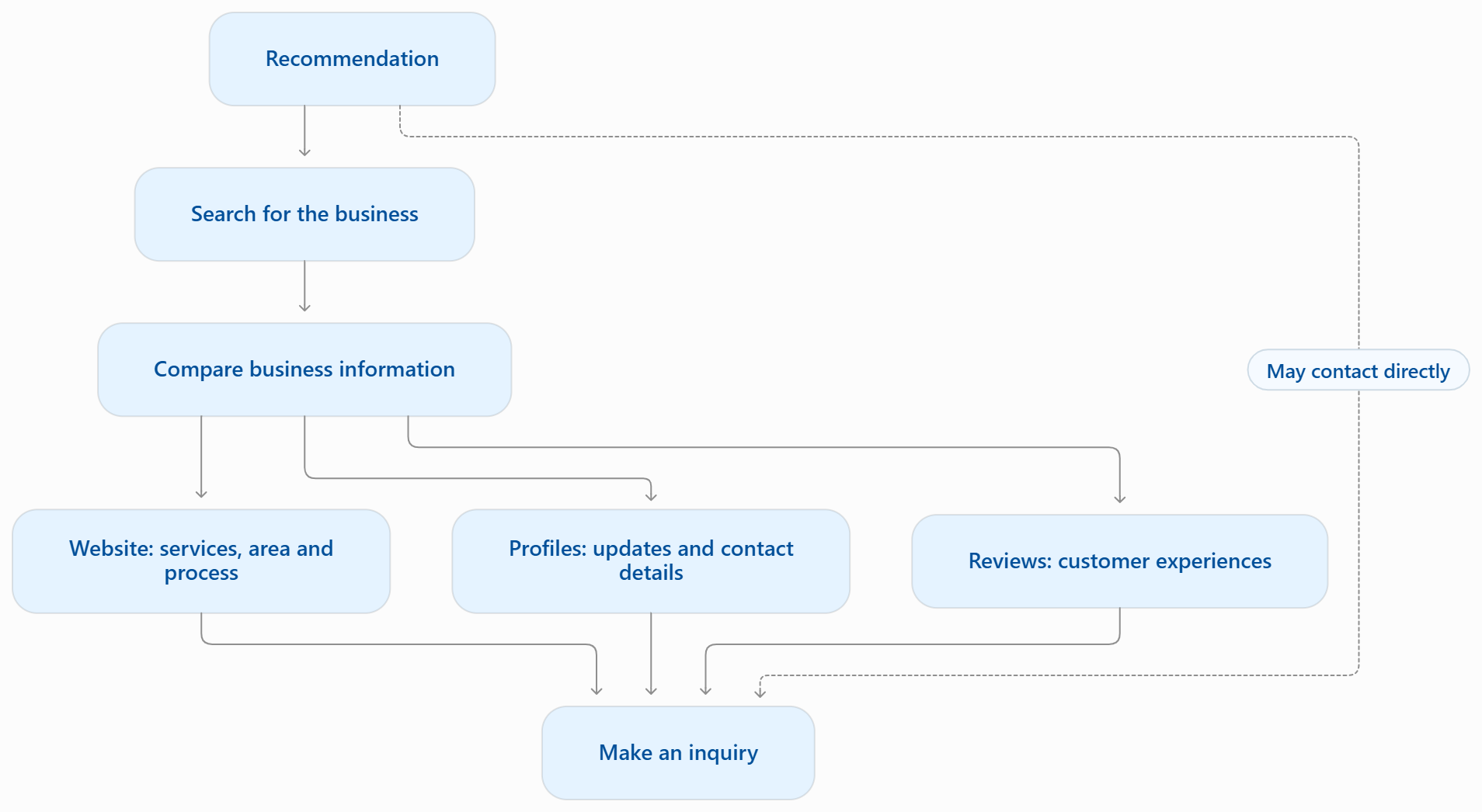
A potential customer hears about your business and looks you up. They find an Instagram profile, a directory listing, and a few photos but still cannot tell whether you offer the service they need, cover their town, or accept new bookings. They could send a message. They could call. Either way, getting a basic answer takes more effort than it should.
For a small-business owner, that uncertainty creates work on both sides. You answer the same questions between appointments, explain your service area repeatedly, and direct people from one profile to another. Some customers will happily ask. Others may postpone the decision or contact another business with clearer information. Every unanswered question does not mean a lost sale, but unnecessary friction can make an inquiry harder to earn.
A useful website brings your essential information, evidence of your work, and next steps together in one destination you manage. A customer can check what you do, see whether you serve their area, and request a quote without piecing together details from several places. Your social profiles and directory listings can then point people toward that clear next step.
That does not mean every business needs a large, custom-built website or an online store. A solo operator might need one well-organized page. A contractor may need service pages, project examples, and a quote form. A retailer may need customers to browse products and pay online. The right starting point is the smallest manageable site that helps your customers complete a useful task. A website alone does not guarantee traffic, inquiries, or sales.
This guide will help you decide what is enough for your business, what information to include, and how to judge whether the site is helping. We will compare websites with social media and directories, look at different business models, work through a clearly hypothetical return-on-effort calculation, and finish with a practical first-step checklist.
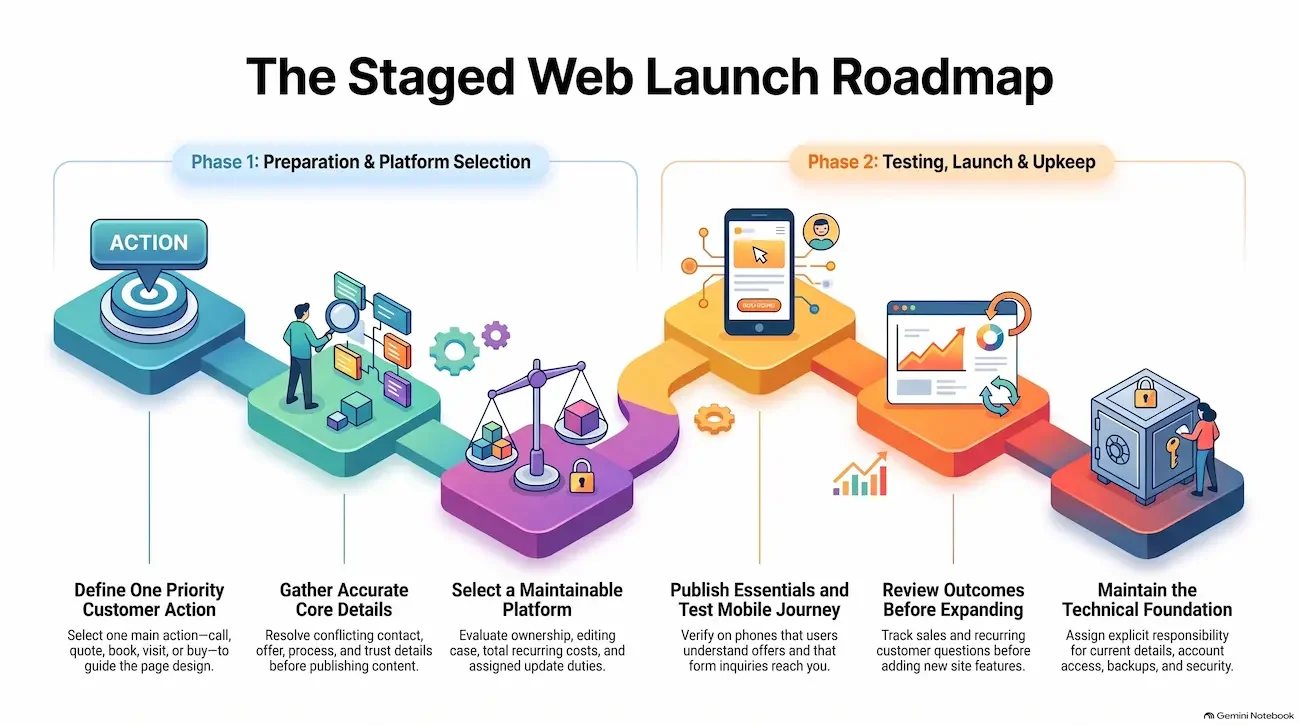
Before you begin, choose one customer action you want to make easier: request a quote, book an appointment, buy a product, or confirm that you serve their area. That decision gives your website a purpose and helps keep the scope and budget under control.
What a Business Website Can Do and What It Cannot Promise
Give Customers One Dependable Place to Understand Your Offer
A useful website helps customers answer their main questions and take the next step. It brings together your services or products, location or service area, contact details, relevant policies, and evidence of your expertise. Where appropriate, it also lets people book an appointment or complete a purchase.
Having this information somewhere online is different from organizing it around a customer’s decision. Your social posts might showcase recent work, while a directory lists your phone number. Neither necessarily explains whether you handle the customer’s particular job or what happens after they contact you.
For example, a contractor’s service page can state which towns the business serves, explain how estimates work, show relevant project photos, and provide a clear way to request a quote. Customers can check whether the business fits their needs before making contact. That gives both sides a better starting point for a qualified inquiry.
Expert tip: Start with the customer’s main task calling, requesting a quote, booking, visiting, or buying. Make that action easy to find on the page where the customer is likely to need it.
Separate a Plausible Benefit From a Guaranteed Result
A website can support trust, discovery, and clearer decisions, but it cannot guarantee customers. Publishing a site does not automatically produce leads, sales, higher search rankings, or a wider customer base.
Results depend on your offer, its relevance to the audience, competition, content, promotion, and customer experience. Your ability to respond and deliver matters, too. A clear quote form may make contacting you easier, but it cannot compensate for inquiries that sit unanswered.
Online access provides useful context. The U.S. Census Bureau reported that 95% of U.S. households had at least one type of computer and 90% had a broadband subscription in 2021. These are historical household-access figures not evidence that a particular business will attract customers or convert website visitors.
Broader reach is also a possibility when your offer can travel. SCORE discusses online selling as a way to reach customers outside a local area. For a business selling shippable products, that may be relevant. A lawn-care company, however, still needs inquiries from customers within a workable service area. More distant visitors would not necessarily help.
Treat the Website as One Part of Your Online Presence
Choose a site you can maintain, then give customers reasons and routes to visit it. Your website can work alongside social media, directory listings, referrals, and other marketing channels.
It still needs hosting the service that keeps its files available online along with secure account access, updates, and routine checks. Someone should keep business information accurate and confirm that forms, booking tools, and contact links work. Publishing alone does not make a site easy to discover.
A website also gives you a separate place to keep essential information if access to a social account or a platform’s rules changes. That offers continuity, but the website itself can experience outages or account problems.
The practical decision is therefore about your customer’s journey and your capacity to support it. If customers mainly need to confirm your services and request a quote, a small, accurate site may be enough. Add more pages or features when they solve a clear customer problem and when you have the time or support to keep them useful.
Website or Social Profile? Give Each Channel a Clear Job
Use each channel to help customers complete a specific task. Social profiles can introduce your business, support conversations, and share updates. Your website can bring detailed information and customer actions together in one organized destination.
These roles complement each other. Features, reach, and policies vary by
platform, and neither a social profile nor a website guarantees sales. Use this
comparison to decide where information belongs and where to send an interested
customer next.
|
Customer need |
Business website role |
Social profile role |
Best next action |
|
Understand the offer |
Explain services or products, who they suit, location or service area, and how the process works. |
Introduce the offer through updates, short explanations, and examples. |
Link the post to the relevant service or product page. |
|
Check credibility |
Present relevant experience, genuine credentials, work examples, policies, and clear business details. |
Show activity and support conversation through posts and interactions, depending on the platform. |
Share accurate, permission-cleared proof and make contacting you easy. |
|
Get an answer or make contact |
Provide a preferred contact route, inquiry form, booking option, or purchase path. |
Let people ask questions or respond to posts, subject to platform features and access. |
Direct customers to a route you can monitor and answer reliably. |
|
Confirm location, service area, or hours |
Keep essential location and service details together. |
Share timely updates, such as a temporary closure or changed hours. |
Update the site and keep connected listings consistent. |
|
Discover the business |
Provide useful pages that may support search discovery, depending on relevance, competition, and promotion. |
Introduce the business within the platform’s distribution and rules. |
Give interested people a clear next step wherever they find you. |
|
Review policies or buying details |
Explain booking, payment, fulfillment, and relevant policies in an organized place. |
Highlight announcements or promotions and link to full details. |
Keep the complete, current details on the site and link directly to them. |
Connect Social Updates to Useful Website Pages
A social post can start the conversation; a relevant website page can help the customer act. You do not need to move every interaction away from social media. Give people somewhere useful to go when they need more detail.
For example, a landscaping company could announce a new irrigation-repair service through a short post. That post could link to a page explaining the service area, the types of repairs offered, how assessment visits work, and how to request a quote. A customer should not have to search through older posts to piece those answers together.
Link to the page that matches the post’s promise. If you announce irrigation repairs, send visitors to that service page rather than making them navigate from the homepage.
Choose contact routes with the same care. If you reliably answer email but rarely check social messages, make your inquiry form or email address the main next step. Adding more contact options only helps when someone can monitor them.
Your website still needs reliable hosting, secure account access, maintenance, and promotion. Managing your own destination gives you more say over its content and structure, but it does not remove operational risks. The manageable approach is to keep essential details accurate on the site, use social profiles for relevant updates and conversations, and connect the two with clear links.
Match the Site to the Business and Its Customer Journey
Build around the decision your customer needs to make. A homeowner requesting a repair, a client comparing consultants, and a diner checking tonight’s menu need different information. Your site’s size and features should follow those needs.
Local Repair or Home-Service Business: Make Fit and Contact Obvious
A service page should quickly answer: Do you handle this job, do you serve my area, and how do I contact you? Follow those answers with the estimate process and what happens after someone submits an inquiry. If you offer urgent assistance, distinguish that contact route from routine requests and accurately state its availability.
A long brand story can wait until these practical questions are answered. Someone with a leaking pipe may appreciate your experience, but first they need to know whether you can help at their address.
A useful page path takes customers from the service description to coverage and estimate details, then to a call or quote request. Put the relevant information close to the action so visitors can make an informed inquiry.
Hypothetical example: A two-person home-repair business
directs referred customers to its social profile. Several people ask whether it
covers Northfield and whether an estimate requires a visit. The owner adds a
service-area page, explains the estimate process, and places a request form
beside the contact details. Customers now have a consistent place to find those
answers. This illustrates an information improvement, not a verified business
result.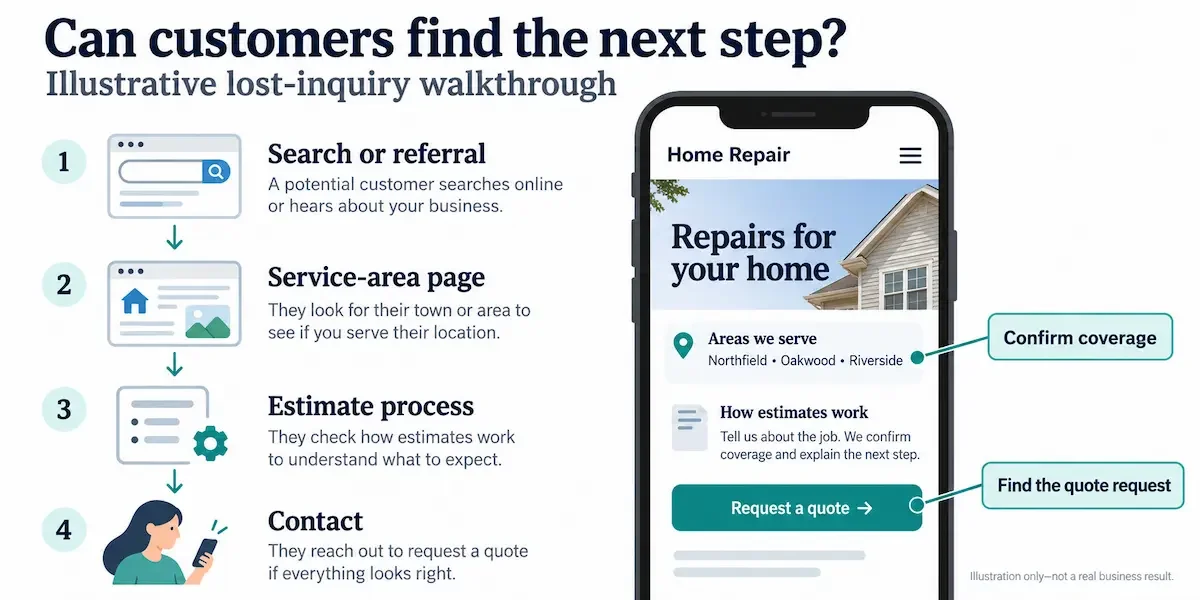
Consultant or Professional Service: Show Fit, Method, and Proof
Help prospective clients recognize whether you solve their kind of problem. State who you work with, what you offer, how you approach an assignment, and how to begin an inquiry.
“Business consulting” leaves much unanswered. A description such as “cash-flow planning for independent retailers” gives a prospective client a clearer starting point provided it accurately reflects your work.
Support that explanation with genuine experience, relevant credentials, permission-cleared examples, or work samples. Never fill gaps with invented client names, testimonials, or results.
Choose proof that suits the service. A designer may benefit from a detailed visual portfolio. Another consultant may gain more from a concise explanation of expertise, a clear process, and an inquiry form that asks only what is needed to assess fit.
Retail Shop: Match the Purchase Path to How You Sell
Decide whether the website should support a store visit or complete a purchase. These are different customer tasks.
For an in-person shop, useful product categories, location, hours, and essential visit information may be enough. Clarify whether displayed items represent your usual range or current availability.
An online store requires more: accurate product information, a working checkout, clear fulfillment and return details, and someone to manage inventory, orders, and customer questions. Add ecommerce when customers need it and the business can maintain it. A manageable site that supports visits can be a sensible starting point.
Restaurant: Answer Visit and Ordering Questions First
Make the menu, location, hours, and reservation or ordering route easy to find. The first screen should help customers understand what you serve, where you are, and how to plan a visit or order.
Keep menus readable on a phone and make time-sensitive details easy to update. When hours, prices, or ordering arrangements change, update the site and relevant listings together. Attractive photography can support the decision, but customers still need clear, current answers before they act.
Build the Smallest Useful Website First
Start with enough information to help a customer decide and act. A small site with accurate details and a working contact route is a useful foundation. Expand it when customer needs justify the extra work.
Choose Essential Pages and Information
Use this checklist to decide what belongs on your starter site. These items can become separate pages or sections of a carefully organized one-page website.
- Home: Explain what you do, whom you serve, your location or service area where relevant, and the main next action.
- Services or products: Describe the offer, who it suits, and how to proceed. Include details customers need to judge whether it fits.
- About or trust information: Show relevant experience, genuine credentials, real work examples, or a clear explanation of your process.
- Contact: Provide a contact route you monitor, relevant location or coverage details, and a form if it makes inquiries easier.
- Process and policy details: Explain booking, estimates, fulfillment, payment, or other conditions customers need to understand before acting.
Choose the structure according to the amount of information involved. A solo operator with one straightforward service might need a single page. A business offering several distinct services may need separate pages so customers can find the right details without searching through unrelated content.
Make credibility specific. Use your actual experience, credentials you hold, project photos you have permission to publish, and permission-cleared reviews. If you do not yet have customer reviews, explain your process clearly rather than inventing proof or results.
Add Features Only When They Solve a Real Need
Every feature should help a customer complete a task and have someone responsible for maintaining it.
Add booking when customers need to choose a time and you can keep availability accurate. Add ecommerce when customers need to buy online and you can manage orders and fulfillment. A portfolio earns its place when examples help customers judge fit. Detailed resources are useful when they answer recurring questions or support a decision.
Apply the same test to chat, animation, and automation. A chat option creates an expectation of an answer; someone must manage it or clearly explain its limits. Animation should preserve readable content and easy navigation. Platform availability alone is not a reason to add either.
When comparing a hosted website builder or content management system the tool used to edit your site look beyond the advertised starting price. Compare editing ease, mobile-ready templates, migration or export options, support, and total recurring costs. Check which necessary features cost extra and whether you can update routine information yourself.
Test the Basic Journey Before Launch
Use a phone to complete the same task you expect a customer to complete. Find the main offer, confirm the location or service area where applicable, and reach the primary action.
Then test the form or booking path using clearly labeled test details and only the information necessary. Confirm that the inquiry reaches the right inbox or system and that any confirmation explains what happens next. Avoid creating an unintended paid order or occupying a real appointment slot.
Check that text is readable, links are easy to tap, contact options are visible, and forms ask only for information you need to handle the request.
Finally, review services, hours, location, published prices, availability, and policies. Repeat the relevant checks after changes. A website remains useful when its information and customer journey stay accurate.
Budget, Upkeep, and Measurement Without Overbuilding
Budget for the Full Cost of Running the Site
Compare the cost of keeping the site useful, not just getting it launched. Your budget may include:
- Domain registration: Your website address, renewed periodically.
- Platform or hosting: The service used to build the site or keep it available online.
- Design and content: Initial setup, writing, photography, and later changes.
- Booking or payment features: Any tools needed to manage appointments or purchases, including applicable transaction fees.
- Maintenance and protection: Updates, backups, security, and professional help when needed.
Some services bundle these costs; others charge separately. Compare total recurring costs, support, account ownership, and migration options before committing. Ask what happens if you change providers and which content or functionality you can take with you.
Keep administrative access to your domain and website accounts. A developer can help manage them, but the business should retain access. Tie renewal notices and account-recovery details to a monitored business contact so an expired domain or departed supplier does not leave you scrambling.
Use a Hypothetical Calculation to Assess Site Costs
Illustrative example only not an industry benchmark or forecast.
Suppose a small service business has these monthly figures:
|
Assumption |
Hypothetical amount |
|
Basic website operating cost |
40 currency units |
|
Relevant inquiries attributed to the site |
8 |
|
Inquiries that become completed jobs |
2 |
|
Gross profit per job, before website costs |
120 currency units. |
Gross profit means revenue minus the direct costs of delivering the work. It is different from revenue and does not necessarily account for all business overhead.
Using those assumptions:
- Attributed gross profit: 2 jobs × 120 = 240 currency units.
- Amount remaining after the monthly site cost: 240 − 40 = 200 currency units.
- Site-cost break-even point: 40 ÷ 120 ≈ 0.34 jobs. One completed job would exceed the assumed monthly site cost in gross-profit terms.
The remaining 200 units are not necessarily net profit. This simplified calculation excludes any additional costs not captured in the assumptions, such as initial development, advertising, or the owner’s time.
Its purpose is to show how to compare credible site-influenced outcomes with costs. Replace every assumption with your own figures. Inquiry quality, actual margins, and attribution matter: a referred customer who checks your site before calling may have been helped by the website, but the site did not necessarily originate that customer.
Measure Actions That Matter to the Business
Track useful customer actions alongside visits. Depending on your business, those actions might be qualified calls, quote requests, bookings, or purchases.
Check quality as well as quantity. Does the inquiry match your service, coverage area, and offer? Does it progress to a conversation, appointment, or completed sale? A button click alone does not establish that someone became a customer.
Google Search Console helps you review Google search performance and whether important pages are indexed meaning included in Google’s searchable collection. It can help identify visibility issues, but it does not guarantee rankings. Search Console Help
A privacy-conscious analytics tool can also help measure useful actions. Configure it around specific questions, such as whether visitors reach the quote form, while accounting for the business’s applicable privacy obligations. Collect only information needed for a clear purpose.
Keep the Site Accurate and Protected
Give upkeep a place in your routine. Choose a review frequency you can maintain, and check affected pages whenever services, location, hours, prices, availability, or policies change.
During that review:
- Test forms, contact routes, booking paths, and important links.
- Confirm that backups exist and understand how restoration works.
- Read security notices and act on relevant updates.
- Check that renewal and recovery contacts remain current.
Use a page-speed checker and an accessibility checker to identify potential problems, then review the site manually on a phone and with a keyboard. Automated scans cannot identify every accessibility barrier. Confirm that you can reach links and form controls, see which item is selected, and complete the main task. W3C
For eligible local businesses, a Google Business Profile can complement the website. Google’s eligibility guidance generally requires in-person customer contact during stated hours. Use the listing to support local discovery and the site to explain services, policies, and next steps in greater detail. Google Business Profile Help
For plain-language security guidance, consult the FTC’s Cybersecurity for Small Business resources, highlighted in its January 2026 Data Privacy Day material. Federal Trade Commission Keep inquiry forms proportionate to the task, explain how inquiries will be handled, and avoid requesting sensitive details you do not need.